Monday, October 26, 2020
What's New in Microsoft Teams | Microsoft Ignite 2020
What's New in Microsoft Teams | Microsoft Ignite 2020: Today at Ignite, we are announcing a ton of new capabilities to help people stay connected, collaborate, and build solutions in Teams. Here’s what’s new in: Meetings Meeting room experiences Calling Chat and collaboration Microsoft 365 integrations Firstline Workers Healthcare Security and compli...

Sunday, May 24, 2020
Self Service Password reset (SSPR) in Azure
Self service password reset is a Azure Active Directory feature which enabled end user to reset their password by them self without contacting IT support.
Platform
Azure
Affected platform
Azure
Office 365
License requirement
Implementation roles
Global admin
Enabled Self Service Password Reset
Create dynamic membership groups
What is dynamic membership group?
Rules can be used to determine group membership based on user or devices attributes. Basically it is a security group and the members inside the security group keep coming in or going out based on user's device's properties.
Find all properties and operands that can be used in the rule at below article.
How to create membership group
1. Go to Azure Active Directory
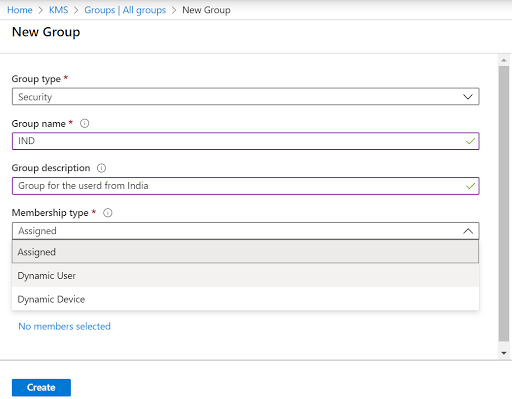
2. Click on Groups --> New group and select membership type as dynamic user
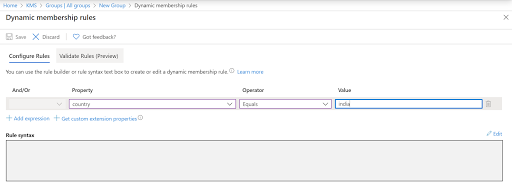
3. Add membership rule, In this case get all users from country INDIA
4. Click on validate tab to check the rule
5. Add users who country set as INDIA
6. Verification is success
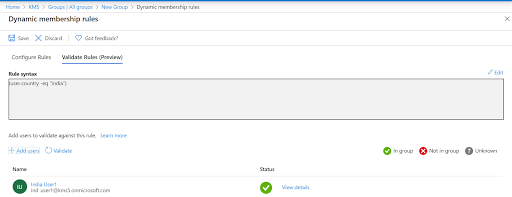
7. User added in the group
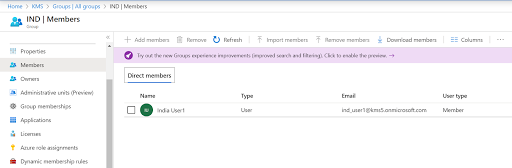
Thursday, May 21, 2020
Layers of access in SharePoint Online
Office 365 SharePoint Online is providing multiple layer access to the customers. Many of us spent lot of effort to protect the content and grant the correct access to the content that resided in SharePoint.
There are multiple layers of access is available in SharePoint Online. Look at all layers in below image.
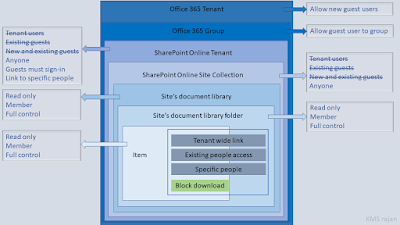
e,g scenario for above image
Allow external users with signing-in using their account. Site owner can decide upon content access to external. If need restricted access to a site then SPO Admin can restrict specific site from externals.
1.
There are multiple layers of access is available in SharePoint Online. Look at all layers in below image.

e,g scenario for above image
Allow external users with signing-in using their account. Site owner can decide upon content access to external. If need restricted access to a site then SPO Admin can restrict specific site from externals.
1.
Monday, March 2, 2020
Microsoft 365 Enterprise - Identity and Authentication
There are two types of identity in Microsoft 365
1. Cloud only: The user account created and resides in Azure Active Directory
2. Hybrid: User accounts are stored in both on-opem and Azure. Active Directory Domain Services (ADDS) stores the users credentials. It is an authorized source and Azure Active Directory is synched set
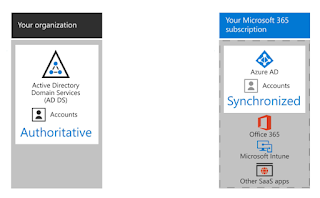
Hybrid Identity:
1. AD Connect is responsible for synching user account to Azure Active Directory
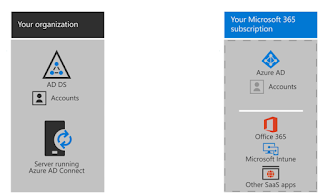
Hybrid Identity Authentications
1. Managed Identity
2. Federated Identity
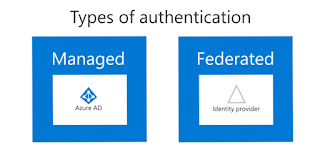
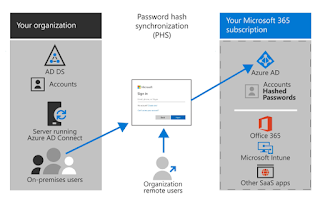
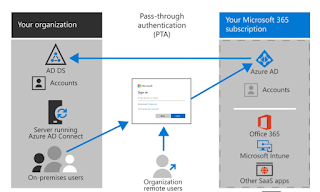
Managed Identity types:
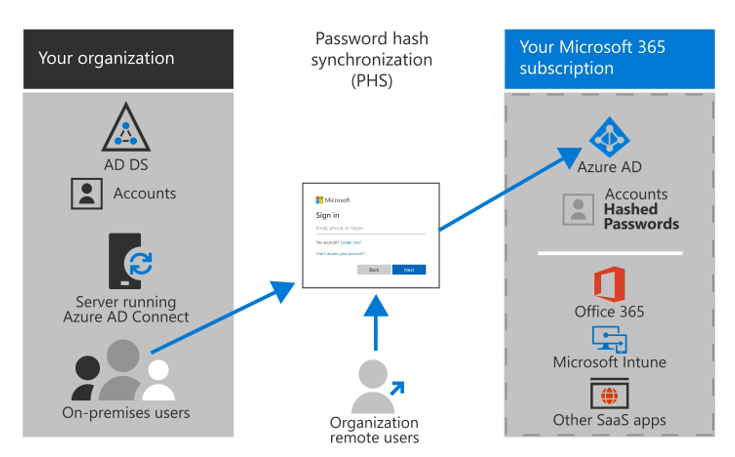
1. PHS
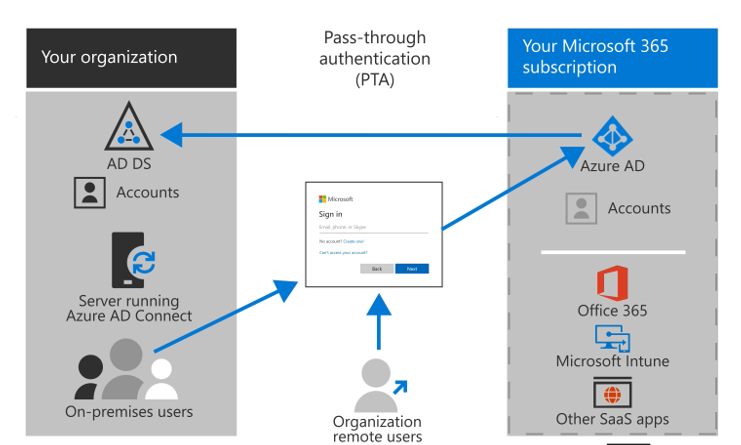
2. PTA
1. Cloud only: The user account created and resides in Azure Active Directory
2. Hybrid: User accounts are stored in both on-opem and Azure. Active Directory Domain Services (ADDS) stores the users credentials. It is an authorized source and Azure Active Directory is synched set
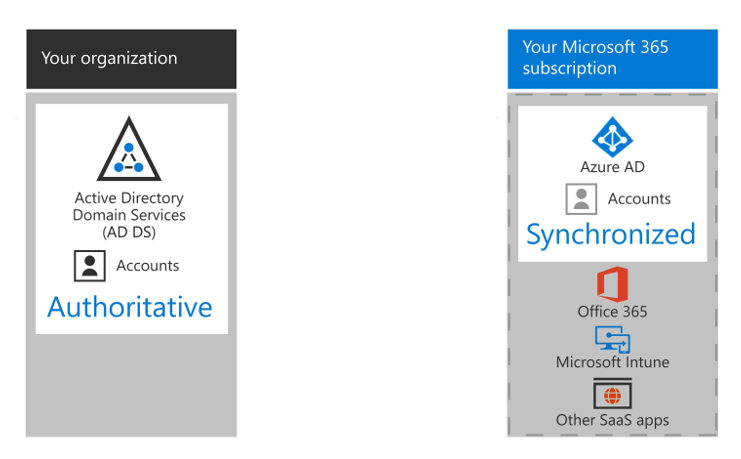
Hybrid Identity:
1. AD Connect is responsible for synching user account to Azure Active Directory
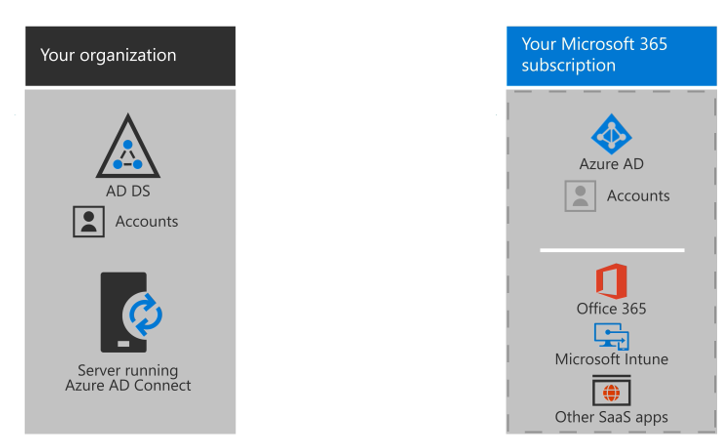
Hybrid Identity Authentications
1. Managed Identity
2. Federated Identity
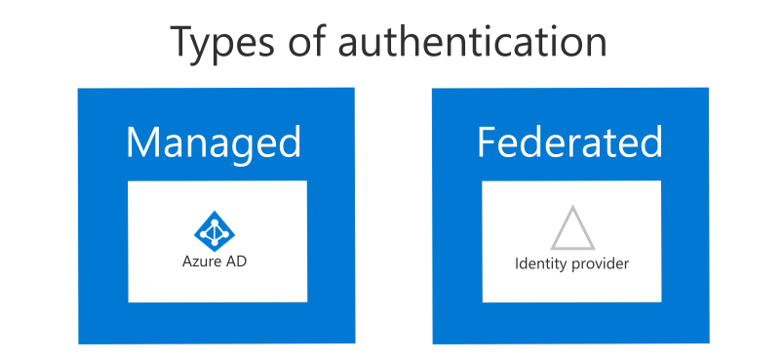
Managed Identity types:
1. PHS
2. PTA
Saturday, February 22, 2020
Office 365 security & compliance role groups
Microsoft is introducing lot of new feature very often in Office 365 platform. Some of the are belongs to Security and Compliance. But as usual there are some issues with administration. The issue is very simple for e.g if any body wants to drink juice then the customer will have buy minimum 5 liter juice.
Yes, that is the situation. If the same user wants to get retention, records and disposition management then this scoped role groups are not available in user admin center. To assign the role, the tenant administrator have to create the separate custom role groups to achieve similar requirement.
Even after creating custom roles, those roles will not be visible in either in Azure or Office 365 portal. The tenant admin need to add the user directly in the role groups.
Therefore, I would like to recommends below roles for Record management.
Custom Role Group Name: Record operator
Roles to be added: Record management, Audit log view only
Custom Role Group Name: Retention management
Roles to be added: Record management, Retention management, Dispassion management
Yes, that is the situation. If the same user wants to get retention, records and disposition management then this scoped role groups are not available in user admin center. To assign the role, the tenant administrator have to create the separate custom role groups to achieve similar requirement.
Even after creating custom roles, those roles will not be visible in either in Azure or Office 365 portal. The tenant admin need to add the user directly in the role groups.
Therefore, I would like to recommends below roles for Record management.
Custom Role Group Name: Record operator
Roles to be added: Record management, Audit log view only
Custom Role Group Name: Retention management
Roles to be added: Record management, Retention management, Dispassion management
Challenges with SharePoint Online store app
We had worked on requirement for one of our customer. Customer bought license for on-prem product. As a compliment the product offers a free app for SharePoint from Online store.
But the licensed product is not for entire organization, only 10% employees using that on-prem product. We were asked to make the app available to only those 10% people but no luck.
If user request app from SharePoint Online site, Once it is approved by SharePoint Tenant Admin then the app status shows approved from pending approval but now able to add the app to the site.
Raised a support case with microsoft, Microsoft reported the the app has to be first deployed in the SharePoint Online tenant catalog which is very unfortunate.
If the app is deployed at tenant catalog level then the app is visible to all Site Onwer/Site collection administrators.
Another issue is that, the deployed app is not available in the app catalog.
But the licensed product is not for entire organization, only 10% employees using that on-prem product. We were asked to make the app available to only those 10% people but no luck.
If user request app from SharePoint Online site, Once it is approved by SharePoint Tenant Admin then the app status shows approved from pending approval but now able to add the app to the site.
Raised a support case with microsoft, Microsoft reported the the app has to be first deployed in the SharePoint Online tenant catalog which is very unfortunate.
If the app is deployed at tenant catalog level then the app is visible to all Site Onwer/Site collection administrators.
Another issue is that, the deployed app is not available in the app catalog.
Wednesday, May 8, 2019
PowerApps Illustration
All,
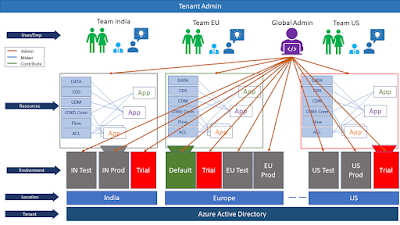
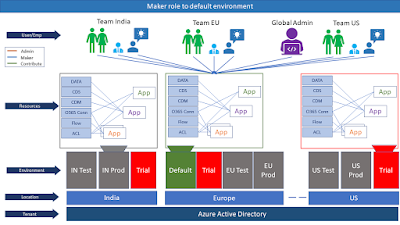
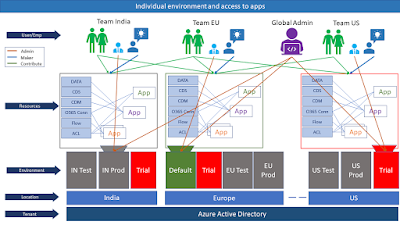
I have created some illustration around PowerApps in Office 365. Initially it was creating many confusion about below questions.
What is environment?
What is CDS?
What is CDM?
Why all these needed?
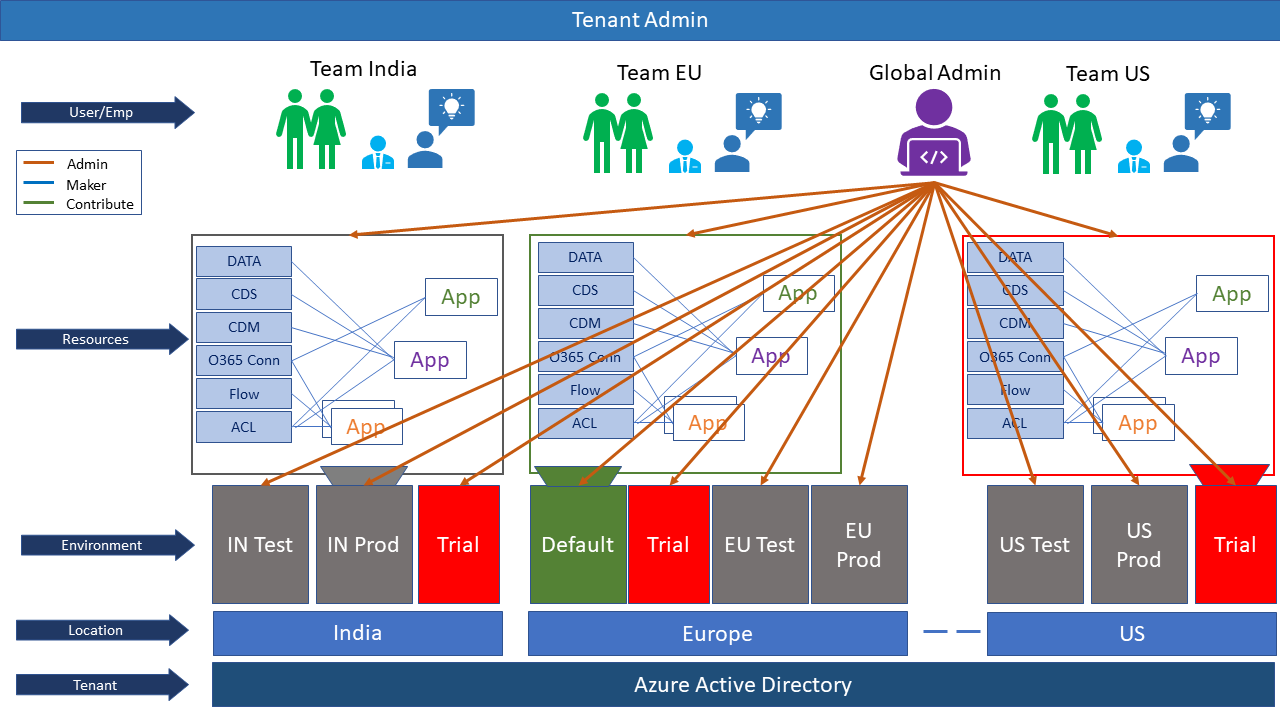
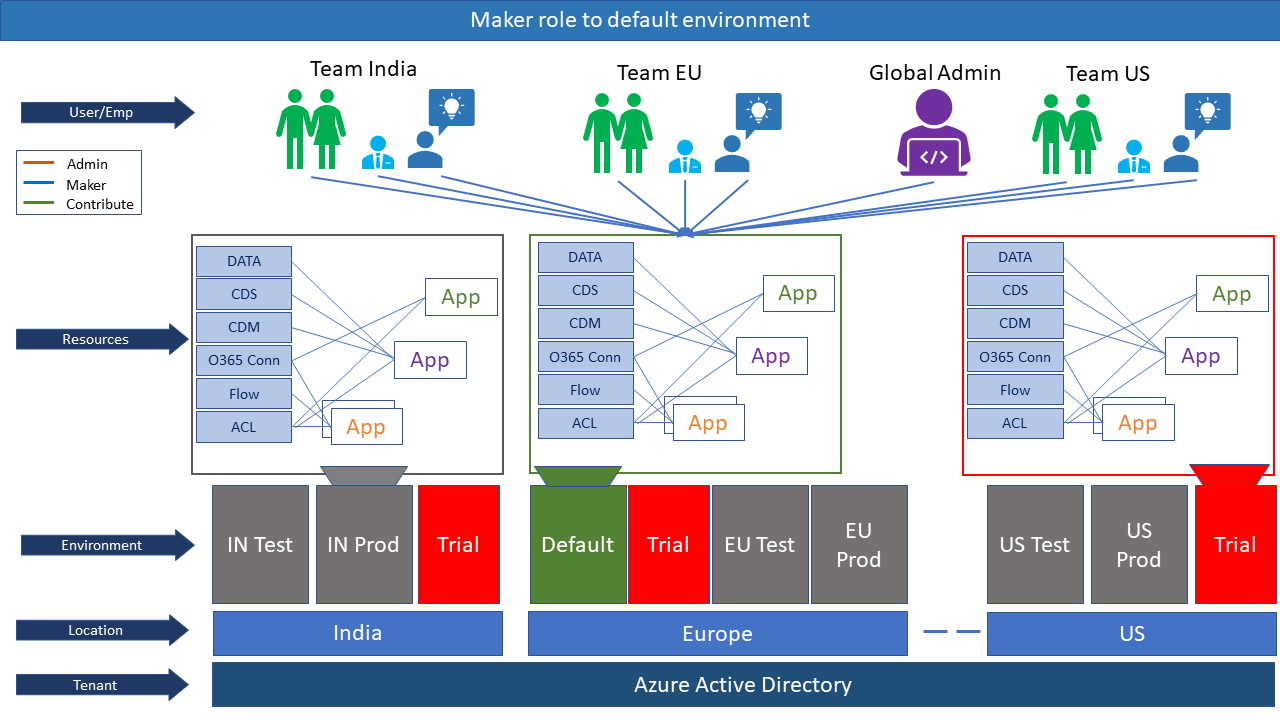
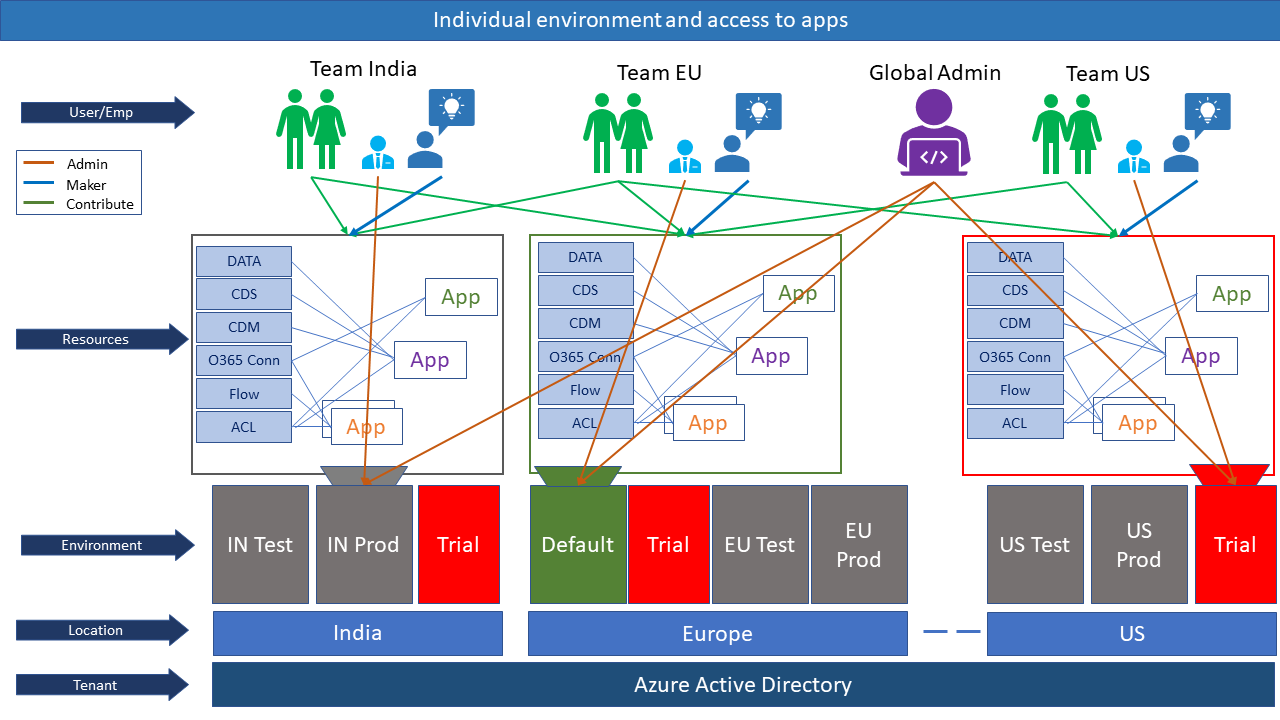
Thought about some pictorial representation around it understand in a better way. Find the details below and share your views and comments to make it more accurate.
1. Overview of PowerApps in Office 365
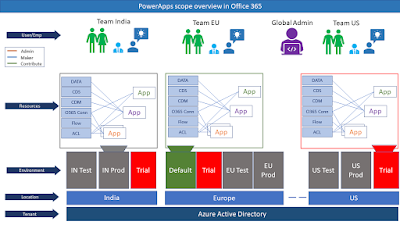
2. Tenant admin can control or administrate and app or environment or resources or DLP etc
 3. Whenever a new user signs up for PowerApps, they are automatically added to the Maker role of the default environment. The default environment is created in the closest region to the default region of the Azure AD tenant
 4. If user assigned with contribute, maker and environment admin access
I have created some illustration around PowerApps in Office 365. Initially it was creating many confusion about below questions.
What is environment?
What is CDS?
What is CDM?
Why all these needed?
Thought about some pictorial representation around it understand in a better way. Find the details below and share your views and comments to make it more accurate.
1. Overview of PowerApps in Office 365
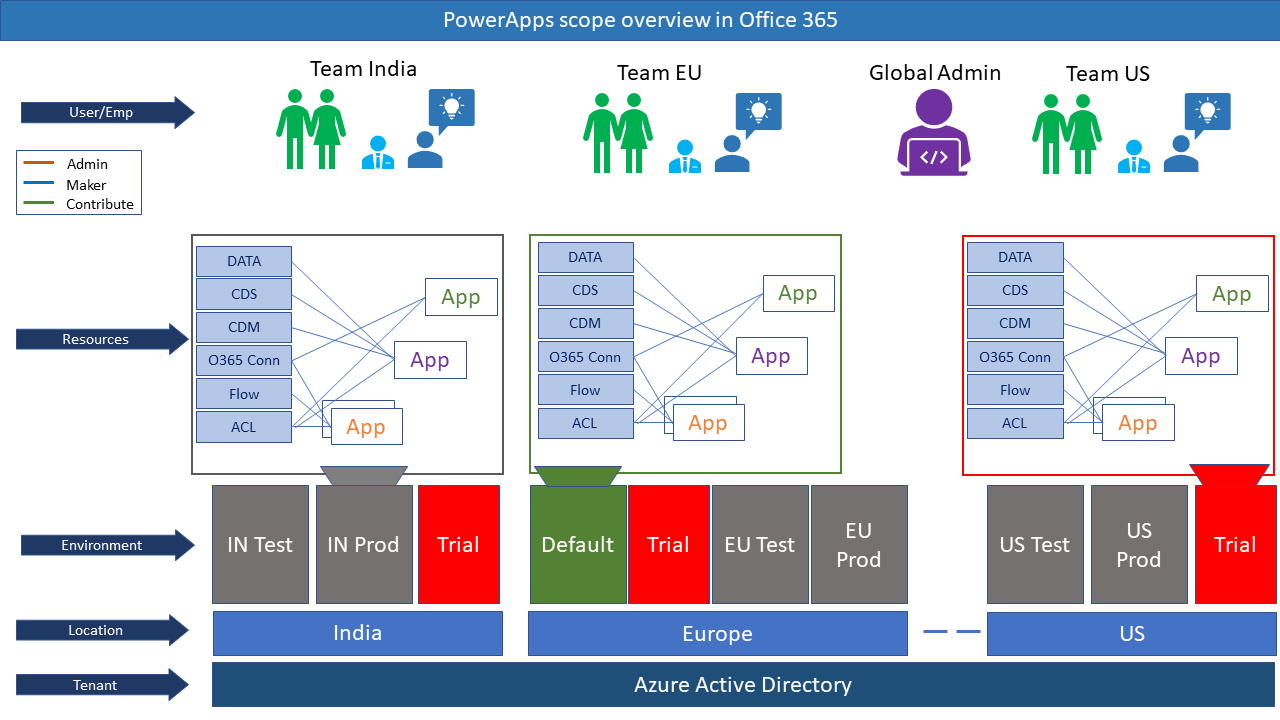
2. Tenant admin can control or administrate and app or environment or resources or DLP etc
Sunday, March 17, 2019
Office 365 StaffHub retirement-
Effective October 1, 2019, Microsoft StaffHub will be retired. We're building StaffHub capabilities, including schedule and task management, into Microsoft Teams. To learn more, read Microsoft StaffHub to be retired.
Microsoft has announced that Office 365 StafHub will be replaced by Shift. Find more details here https://docs.microsoft.com/en-us/microsoftteams/teams-for-firstline-workers/microsoft-staffhub-to-be-retired
Allow corporate announcements to StaffHub members
StaffHub has a feature to make this announcement to all StaffHub users. Find the details below
Send corporate announcements to all StaffHub members
But it is bit challenge to inform only StaffHub Team managers. The PowerShell module does not any commends to get list of Team Managers.
Find the script which will give all StaffHub Team managers from current tenant.
Function ConnectToStaffHub
{
#install StaffHub module
#InstallInstall-Module -Name MicrosoftStaffHub
#Capture global administrator credentials
$cred=Get-Credential
try{
#connect to StaffHub
Connect-StaffHub -Credentials $cred
MsgLog -Msg "Connected to StaffHub successfully" -Cat "1"
}
Catch{
MsgLog -Msg "StaffHub connection failed" -Cat "3"
MsgLog -Msg $_.Exception.Message -Cat "3"
}
}
function MsgLog($Msg,$Cat)
{
# set the new color based on category
if($Cat -eq "1"){
$foreColor="Green"
$Msg= "Success : " + $Msg
}
if($Cat -eq "2")
{
$foreColor="Yellow"
$Msg= "Warning : " + $Msg
}
if($Cat -eq "3"){
$foreColor="Red"
$Msg= "Error : " + $Msg
}
# output
Write-Host $msg -ForegroundColor $foreColor
}
Function GetStaffHubManagers($csvPath)
{
try{
#Get all staffhub teams for tenant
$teamsColl=Get-StaffHubTeamsForTenant
$hubColl = New-Object System.Collections.ArrayList
for($a=0; $a -lt $teamsColl.Id.Count; $a++){
$members=Get-StaffHubMember -TeamId $teamsColl.Id[$a] `
| where IsManager -EQ "True" `
| select Email, State, DisplayName
$temp = New-Object System.Object
$temp | Add-Member -MemberType NoteProperty -Name "TeamName" -Value $teamsColl.Name[$a]
$emails=""
$DispNames=""
foreach($mem in $members){
$emails =$emails+$mem.Email+";"
$DispNames =$DispNames+$mem.DisplayName+";"
}
$temp | Add-Member -MemberType NoteProperty -Name "Email" -Value $emails
$temp | Add-Member -MemberType NoteProperty -Name "DisplayName" -Value $DispNames
$hubColl.Add($temp) | Out-Null
}
$hubColl | Export-Csv -Path $csvPath
MsgLog -Msg "StaffHub information exported" -Cat "1"
}
catch{
MsgLog -Msg "Error : Extract failed" -Cat "3"
MsgLog -Msg $_.Exception.Message -Cat "3"
}
}
ConnectToStaffHub
GetStaffHubManagers -csvPath "C:\KMSlab\StaffHub\Export-Csv new.csv"
Get it from GitHub https://github.com/kmsrajan/O365/tree/master/StaffHub
Microsoft has announced that Office 365 StafHub will be replaced by Shift. Find more details here https://docs.microsoft.com/en-us/microsoftteams/teams-for-firstline-workers/microsoft-staffhub-to-be-retired
Allow corporate announcements to StaffHub members
StaffHub has a feature to make this announcement to all StaffHub users. Find the details below
Send corporate announcements to all StaffHub members
But it is bit challenge to inform only StaffHub Team managers. The PowerShell module does not any commends to get list of Team Managers.
Find the script which will give all StaffHub Team managers from current tenant.
Function ConnectToStaffHub
{
#install StaffHub module
#InstallInstall-Module -Name MicrosoftStaffHub
#Capture global administrator credentials
$cred=Get-Credential
try{
#connect to StaffHub
Connect-StaffHub -Credentials $cred
MsgLog -Msg "Connected to StaffHub successfully" -Cat "1"
}
Catch{
MsgLog -Msg "StaffHub connection failed" -Cat "3"
MsgLog -Msg $_.Exception.Message -Cat "3"
}
}
function MsgLog($Msg,$Cat)
{
# set the new color based on category
if($Cat -eq "1"){
$foreColor="Green"
$Msg= "Success : " + $Msg
}
if($Cat -eq "2")
{
$foreColor="Yellow"
$Msg= "Warning : " + $Msg
}
if($Cat -eq "3"){
$foreColor="Red"
$Msg= "Error : " + $Msg
}
# output
Write-Host $msg -ForegroundColor $foreColor
}
Function GetStaffHubManagers($csvPath)
{
try{
#Get all staffhub teams for tenant
$teamsColl=Get-StaffHubTeamsForTenant
$hubColl = New-Object System.Collections.ArrayList
for($a=0; $a -lt $teamsColl.Id.Count; $a++){
$members=Get-StaffHubMember -TeamId $teamsColl.Id[$a] `
| where IsManager -EQ "True" `
| select Email, State, DisplayName
$temp = New-Object System.Object
$temp | Add-Member -MemberType NoteProperty -Name "TeamName" -Value $teamsColl.Name[$a]
$emails=""
$DispNames=""
foreach($mem in $members){
$emails =$emails+$mem.Email+";"
$DispNames =$DispNames+$mem.DisplayName+";"
}
$temp | Add-Member -MemberType NoteProperty -Name "Email" -Value $emails
$temp | Add-Member -MemberType NoteProperty -Name "DisplayName" -Value $DispNames
$hubColl.Add($temp) | Out-Null
}
$hubColl | Export-Csv -Path $csvPath
MsgLog -Msg "StaffHub information exported" -Cat "1"
}
catch{
MsgLog -Msg "Error : Extract failed" -Cat "3"
MsgLog -Msg $_.Exception.Message -Cat "3"
}
}
ConnectToStaffHub
GetStaffHubManagers -csvPath "C:\KMSlab\StaffHub\Export-Csv new.csv"
Get it from GitHub https://github.com/kmsrajan/O365/tree/master/StaffHub
Sunday, March 3, 2019
Enable IRM in OneDrive For Business
Information Rights Management (IRM) can be used for restricting permission to content in documents, workbooks, and presentations with Office. IRM lets people set access permissions to help prevent sensitive information from being printed, forwarded, or copied by unauthorized people.
Read more about Information Rights Management in Office 365
IRM can be used in SharePoint Online and OneDrive For Business contents. SharePoint Administrator or Global Administrator has to enable IRM at tenant level, so that Office 365 tenant users can use this service on their contents.
How to Enable IRM in OneDrive For Business?
Make sure IRM enabled at tenant level. If not enabled then follow this article
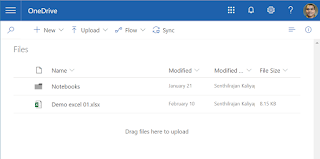
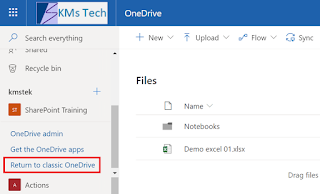
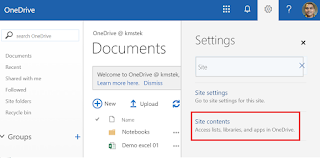
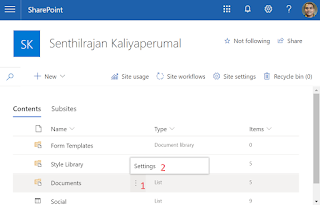
Enjoy protecting your information in Office 365.
Read more about Information Rights Management in Office 365
IRM can be used in SharePoint Online and OneDrive For Business contents. SharePoint Administrator or Global Administrator has to enable IRM at tenant level, so that Office 365 tenant users can use this service on their contents.
How to Enable IRM in OneDrive For Business?
Make sure IRM enabled at tenant level. If not enabled then follow this article
- Login to Office 365 Portal
- Open OneDrive For Business
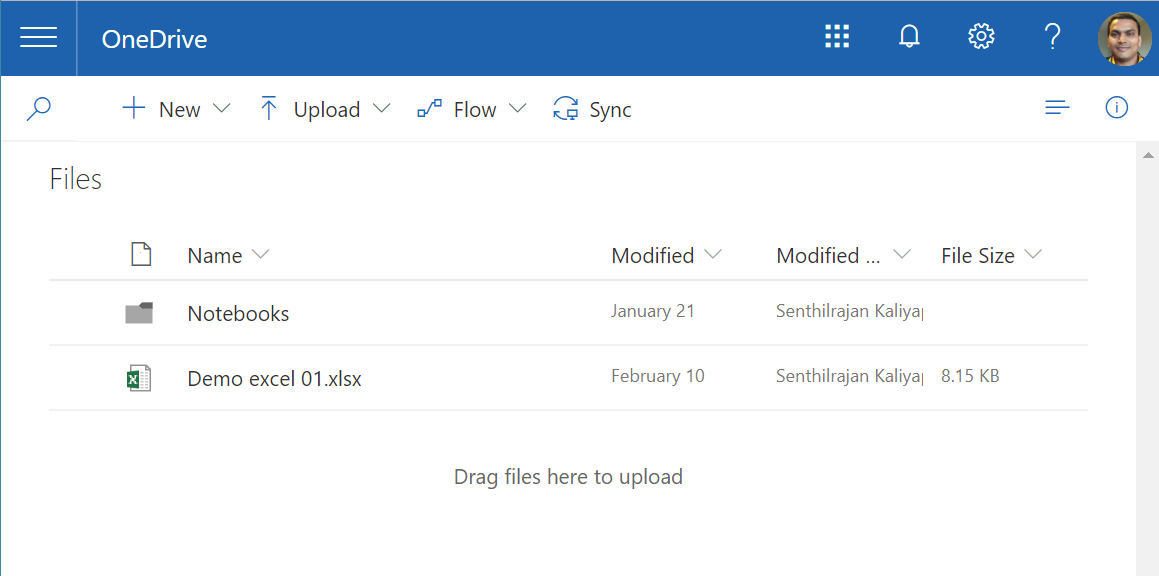
- Change the modern mode to classical mode
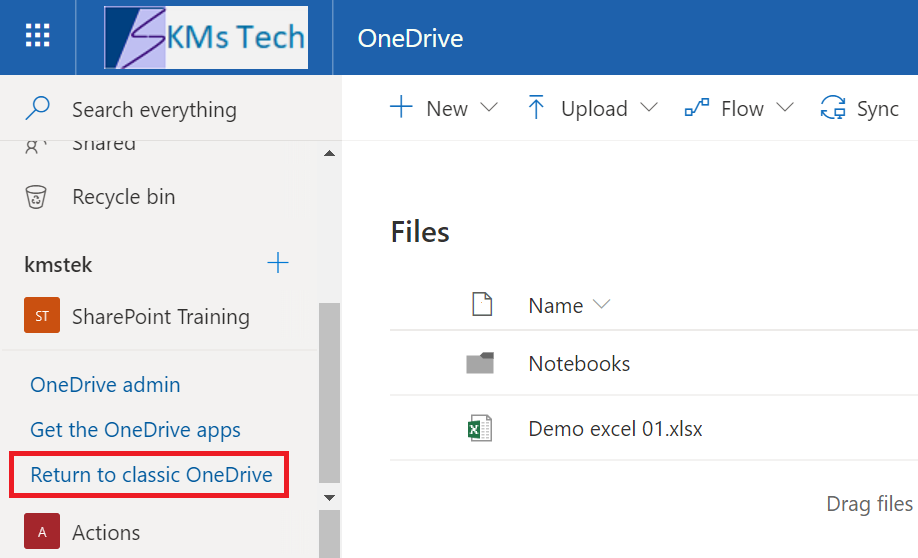
- Click on Settings
- Search "Site Contents"
- Click on Site Contents
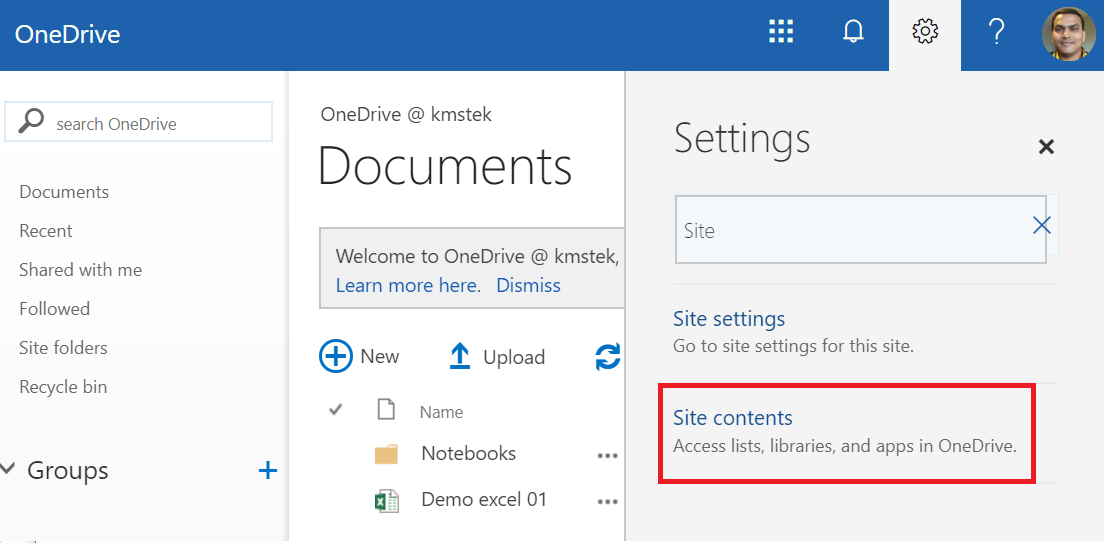
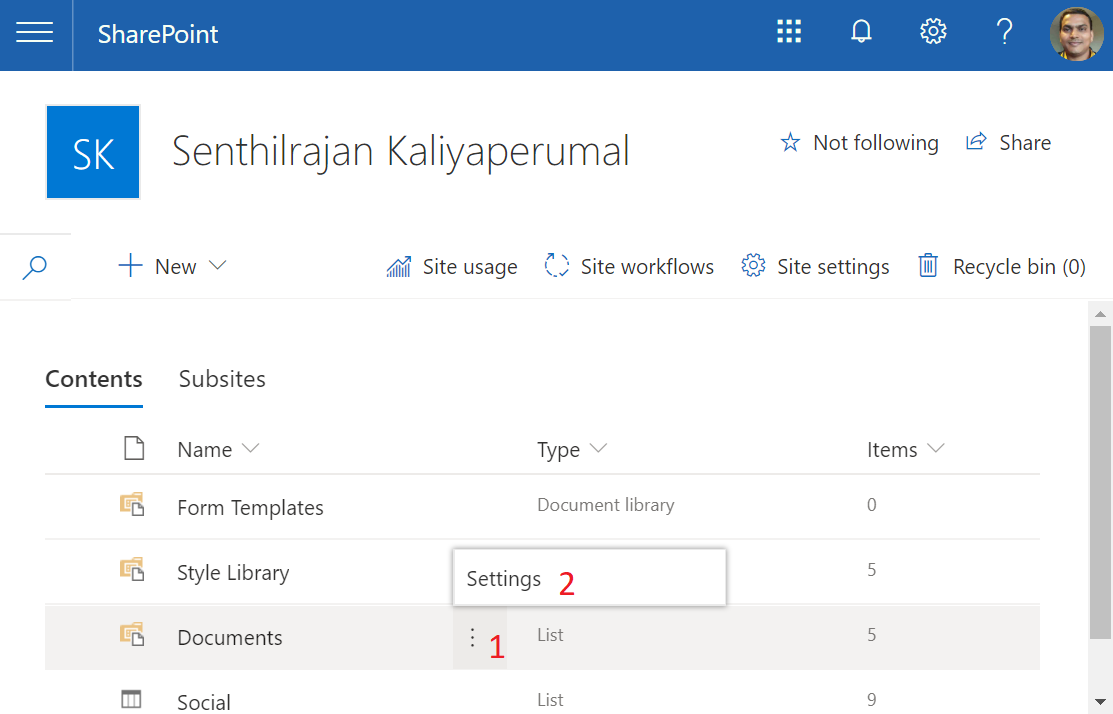
- Hover over mouse on Document and click on ellipses icon (⋮) and click on Settings
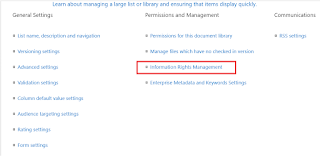
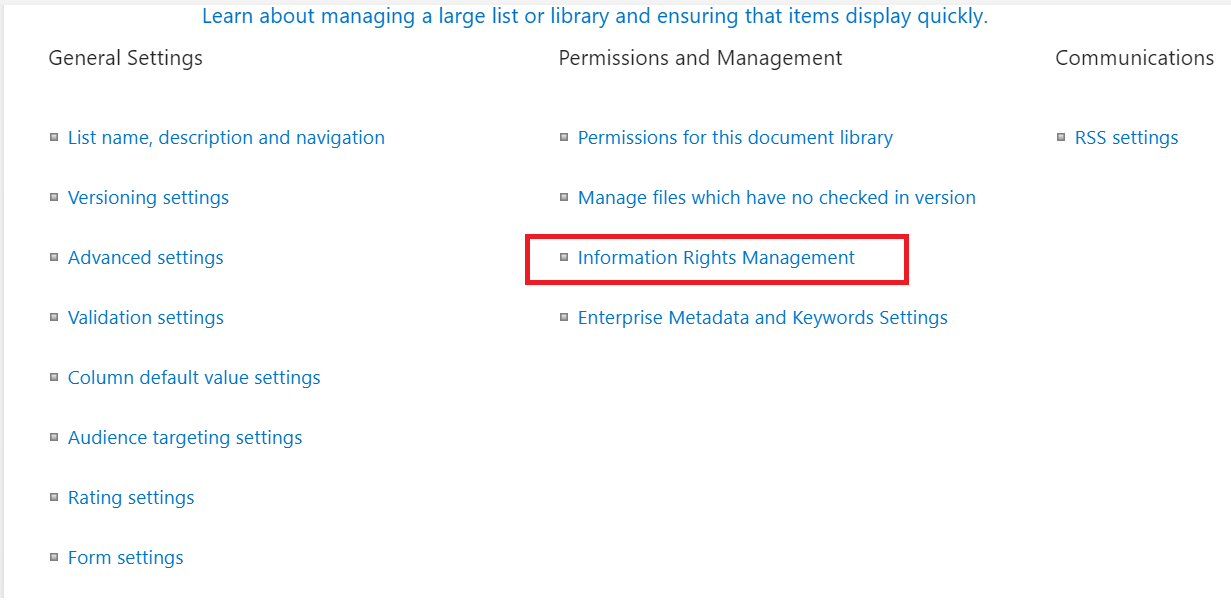
- Click on "Information Rights Management" link under "Permission management" Section
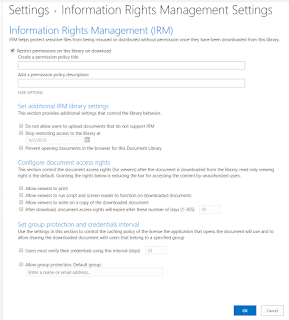
- Enable & configure IRM feature for OneDrive For Business
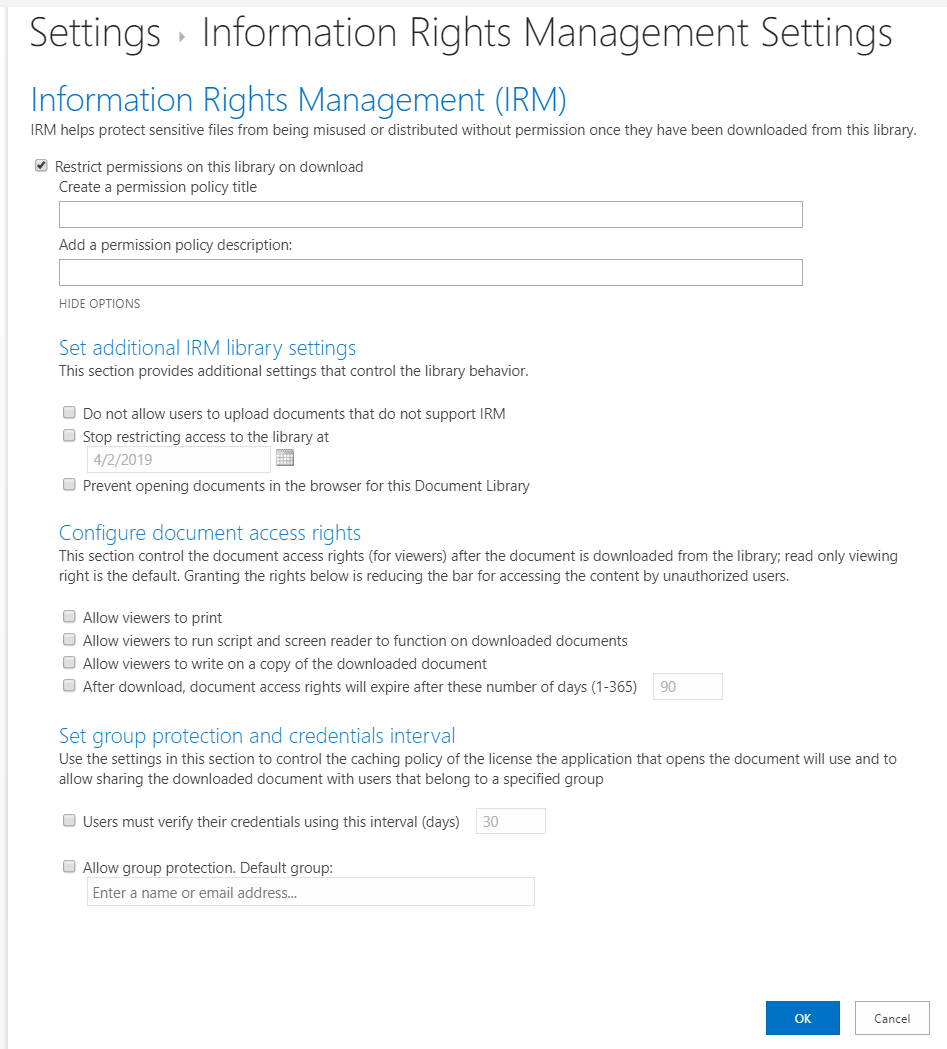
- Click on OK button to save the settings
Enjoy protecting your information in Office 365.
Tuesday, February 12, 2019
O365: Create Planner task from Teams Message
There are many new feature keep coming in Office 365 but there are room for more improvements. Now a days Microsoft and their customers promoting MS Teams for easy collaboration.
MS Teams promoted as easy collaboration tool. Yes, with certain extend. We stopped sending email to team member instead sending Teams message.
How to do any follow up when lot of messages floating in any channel
How to mange tasks from multiple teams and channels
If project team wish to create a new Planner task from MS Teams then there is no feature available in MS Teams. It is be disappointing and question comes on "Is it easy collaboration tool?"
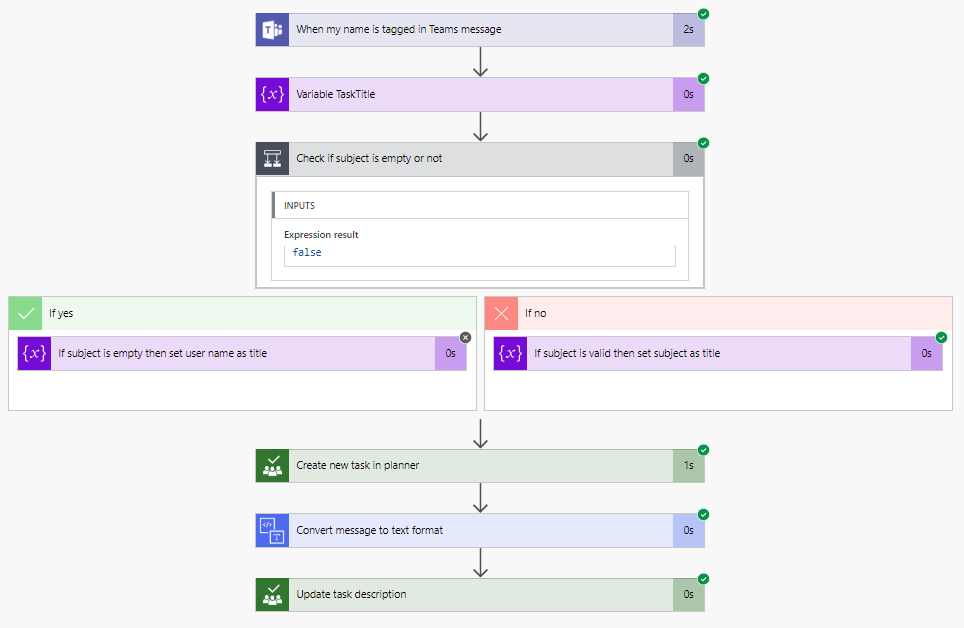
How to create new Planer task from MS Teams message using MS Flow?
- Create a new MS Flow from empty template
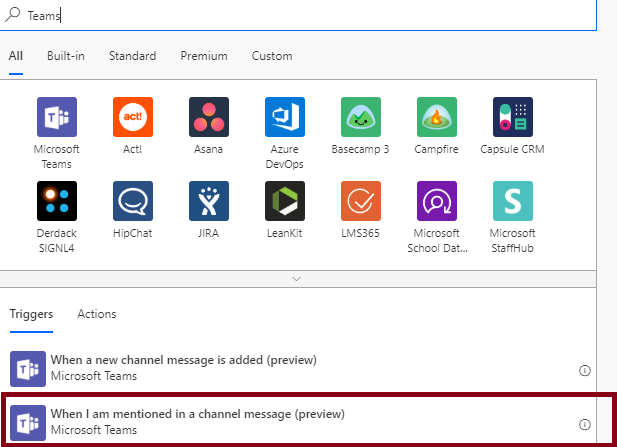
- Set MS Flow trigger as "When I am mentioned in a Channel message"
- Initialize a variable
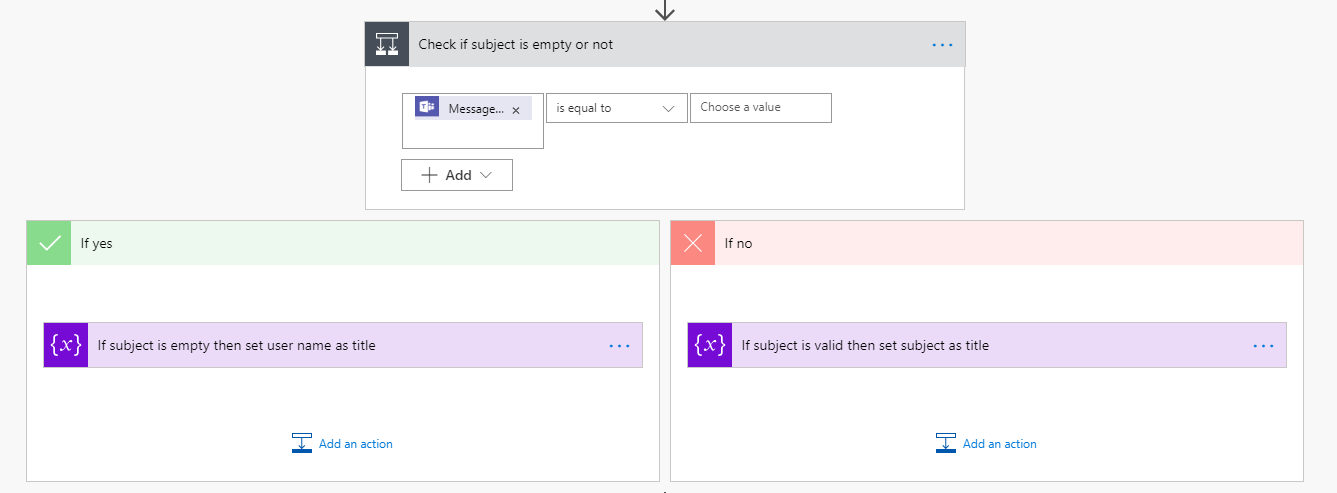
- Check if Teams message contains subject. If Yes, then set Subject as title else set Teams messaged by as title.
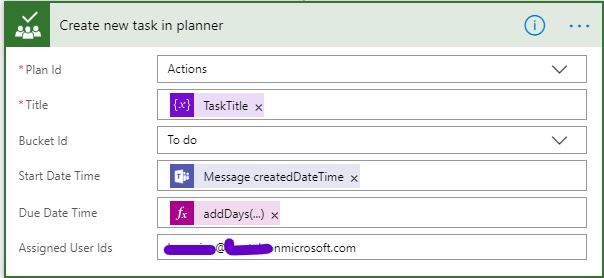
- Create a new Planner task using planner connector and configure remaining parameters
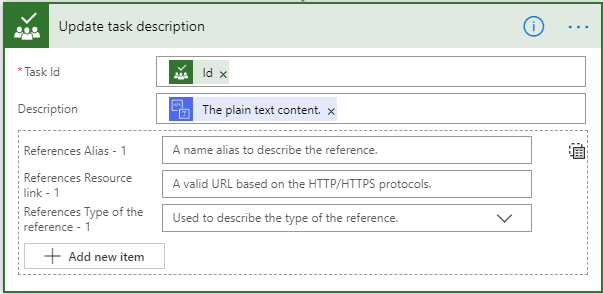
- Use Conversion connector to convert the message body to plain text from HTML content type.

- Update the Planner task description
- Save the change, Enjoy doing follow up on Teams message.
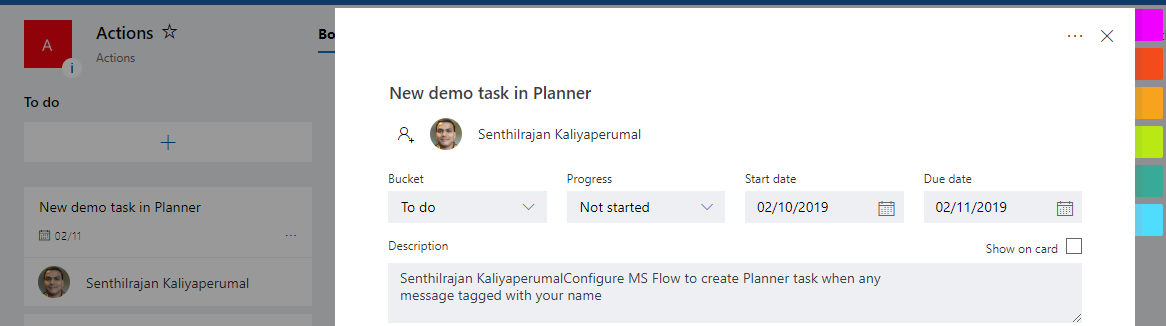
Verification
Run the flow
Create a demo task and tagged to an team member

Find a new task created and assign to a team member
Tuesday, January 1, 2019
Setup free Office 365 subscription
Microsoft offers a developer 1 year free Office 365 subscription for 25 user licenses. Go ahead, subscribe yourself and enjoy with Office 365
https://docs.microsoft.com/en-us/office/developer-program/office-365-developer-program-get-started
https://docs.microsoft.com/en-us/office/developer-program/office-365-developer-program-get-started
Thursday, May 10, 2018
The user or administrator has not consented to use Azure Analysis Service Client
Happy today because spent too much time to find out the issue happened in our Azure Tenant. The issue is very simple but took more time to reach the location.
Background:
• Our development team have registered a AAD app for automatic refresh of Azure Analysis Service model using Azure Function Apps
• The App Registered successfully in AAD and added Azure Analysis Services API Read&Write All model permission (It is bit confusing as the permission text is Read&Write All Models)
• The function App was not refreshing the model as expected.
• Then in addition the AAD App url is updated as “https:// northeurope.asazure.windows.net” (Does anybody think any thing wrong here) by development team.
• Suddenly all Azure Analysis Service authentication got broke in our tenant including production services. Unfortunately this incident happened in a long weekend(4days off 😝)
• A support ticket raised with Microsoft and Azure support team asked us to delete the newly registered AAD App, then all service got started working.
• As expected a huge escalation by customer, all appreciation got in the past is wiped off.
• Unfortunately our team did not get a chance to interact with Microsoft Support team and no error details shared.
My Involvement:
• I am beginner in Azure but a bit curios to analyze what went wrong and took the responsibility but did not aware of the pain at that time.
• Spent around a week time, created multiple scenarios and different combinations but finally ends with nothing. The error was not reproduced.
• Posted in Microsoft technical forum, but public contributors replied “I am wrong” , “We will not address the resolved issue”
• Then again digged futher and got clue from developer that AAD APP url is updated as “https:// northeurope.asazure.windows.net”
• Then narrowed the investigation towards that direction
Investigation:
• Registered a new app in AAD
• Added Azure Analysis Services API Read&Write All Model permissions
• Updated the AAD URL as “https:// northeurope.asazure.windows.net”
• Prepared following PowerShell Script
Install-Module -Name Azure.AnalysisServices
Install-Module -Name SqlServer
$UserCredential = Get-Credential
Login-AzureRmAccount -Credential $UserCredential
$Rolloutenv = "northeurope.asazure.windows.net"
Add-AzureAnalysisServicesAccount -RolloutEnvironment $Rolloutenv -Credential $UserCredential
• Tried connecting to Azure Analysis Services using common resource name as specified in the script
• Got following error
Add-AzureAnalysisServicesAccount : AADSTS65001: The user or administrator has n
ot consented to use the application with ID 'cf710c6e-dfcc-4fa8-a093-d47294e44c
66' named 'Azure Analysis Services Client'. Send an interactive authorization r
equest for this user and resource.
Trace ID: 257d729a-680e-4bea-8b43-86ac839e2f00
Correlation ID: 257d729a-680e-4bea-8b43-86ac839e2f00
Timestamp: 2018-05-09 13:09:27Z
At line:3 char:1
+ Add-AzureAnalysisServicesAccount -RolloutEnvironment $Rolloutenv -Credential
$Us ...
+ ~~~~~~~~~~~~~~~~~~~~~~~~~~~~~~~~~~~~~~~~~~~~~~~~~~~~~~~~~~~~~~~~~~~~~~~~~~~~~
~~~
+ CategoryInfo : CloseError: (:) [Add-AzureAnalysisServicesAccoun
t], AdalServiceException
+ FullyQualifiedErrorId : Microsoft.Azure.Commands.AnalysisServices.Datapl
ane.AddAzureASAccountCommand
• Understood that the AAD App Url wan the culprit which has stopped all authentication of Azure Analysis Services
• When I checked the GUID in internet I got below post where GUID used a resource in the source code.
https://www.csharpcodi.com/vs2/3376/BusinessPlatformApps/Source/Test/Microsoft.Deployment.Tests.Actions/AzureTests/ServicePrincipalTests.cs/
• The I was able to relate the GUID and Error massage.
Conclusion:
• Admin consent error thrown when accessing Azure Analysis services by any application or source code in our tenant.
o Application requested for Azure Analysis Service Access in AAD
o ADD found a AAD APP with “https:// northeurope.asazure.windows.net” as application url.
o AAD redirect the request to AAD app created by development team
o But the AAD App was neither actually requested resource nor Azure Analysis Service API Read & Write All model permission consented
o As a response from AAD, “application is not consented”
Learning:
• AAD is common instance for a tenant. All development, QA and Production resources registered and maintained in same AAD.
• So when we register a AAD app, we have to be more conscious and aware for consequences before giving permission to it.
• Do not update AAD App url with any resource URL because it will create a huge impact.
• Microsoft need to apply a additional validation on AAD app Url that “Common resource Url should not be allowed”
Background:
• Our development team have registered a AAD app for automatic refresh of Azure Analysis Service model using Azure Function Apps
• The App Registered successfully in AAD and added Azure Analysis Services API Read&Write All model permission (It is bit confusing as the permission text is Read&Write All Models)
• The function App was not refreshing the model as expected.
• Then in addition the AAD App url is updated as “https:// northeurope.asazure.windows.net” (Does anybody think any thing wrong here) by development team.
• Suddenly all Azure Analysis Service authentication got broke in our tenant including production services. Unfortunately this incident happened in a long weekend(4days off 😝)
• A support ticket raised with Microsoft and Azure support team asked us to delete the newly registered AAD App, then all service got started working.
• As expected a huge escalation by customer, all appreciation got in the past is wiped off.
• Unfortunately our team did not get a chance to interact with Microsoft Support team and no error details shared.
My Involvement:
• I am beginner in Azure but a bit curios to analyze what went wrong and took the responsibility but did not aware of the pain at that time.
• Spent around a week time, created multiple scenarios and different combinations but finally ends with nothing. The error was not reproduced.
• Posted in Microsoft technical forum, but public contributors replied “I am wrong” , “We will not address the resolved issue”
• Then again digged futher and got clue from developer that AAD APP url is updated as “https:// northeurope.asazure.windows.net”
• Then narrowed the investigation towards that direction
Investigation:
• Registered a new app in AAD
• Added Azure Analysis Services API Read&Write All Model permissions
• Updated the AAD URL as “https:// northeurope.asazure.windows.net”
• Prepared following PowerShell Script
Install-Module -Name Azure.AnalysisServices
Install-Module -Name SqlServer
$UserCredential = Get-Credential
Login-AzureRmAccount -Credential $UserCredential
$Rolloutenv = "northeurope.asazure.windows.net"
Add-AzureAnalysisServicesAccount -RolloutEnvironment $Rolloutenv -Credential $UserCredential
• Tried connecting to Azure Analysis Services using common resource name as specified in the script
• Got following error
Add-AzureAnalysisServicesAccount : AADSTS65001: The user or administrator has n
ot consented to use the application with ID 'cf710c6e-dfcc-4fa8-a093-d47294e44c
66' named 'Azure Analysis Services Client'. Send an interactive authorization r
equest for this user and resource.
Trace ID: 257d729a-680e-4bea-8b43-86ac839e2f00
Correlation ID: 257d729a-680e-4bea-8b43-86ac839e2f00
Timestamp: 2018-05-09 13:09:27Z
At line:3 char:1
+ Add-AzureAnalysisServicesAccount -RolloutEnvironment $Rolloutenv -Credential
$Us ...
+ ~~~~~~~~~~~~~~~~~~~~~~~~~~~~~~~~~~~~~~~~~~~~~~~~~~~~~~~~~~~~~~~~~~~~~~~~~~~~~
~~~
+ CategoryInfo : CloseError: (:) [Add-AzureAnalysisServicesAccoun
t], AdalServiceException
+ FullyQualifiedErrorId : Microsoft.Azure.Commands.AnalysisServices.Datapl
ane.AddAzureASAccountCommand
• Understood that the AAD App Url wan the culprit which has stopped all authentication of Azure Analysis Services
• When I checked the GUID in internet I got below post where GUID used a resource in the source code.
https://www.csharpcodi.com/vs2/3376/BusinessPlatformApps/Source/Test/Microsoft.Deployment.Tests.Actions/AzureTests/ServicePrincipalTests.cs/
• The I was able to relate the GUID and Error massage.
Conclusion:
• Admin consent error thrown when accessing Azure Analysis services by any application or source code in our tenant.
o Application requested for Azure Analysis Service Access in AAD
o ADD found a AAD APP with “https:// northeurope.asazure.windows.net” as application url.
o AAD redirect the request to AAD app created by development team
o But the AAD App was neither actually requested resource nor Azure Analysis Service API Read & Write All model permission consented
o As a response from AAD, “application is not consented”
Learning:
• AAD is common instance for a tenant. All development, QA and Production resources registered and maintained in same AAD.
• So when we register a AAD app, we have to be more conscious and aware for consequences before giving permission to it.
• Do not update AAD App url with any resource URL because it will create a huge impact.
• Microsoft need to apply a additional validation on AAD app Url that “Common resource Url should not be allowed”
Wednesday, March 28, 2018
Access SharePoint online documents using Microsoft Graph API
Hi,
Microsoft Graph API is one of the great feature which allows to access most of Office 365 services/objects from single endpoint. Recently I was asked to check the possibilities of accessing SharePoint Document libraries using Microsoft Graph API.
Well it is possible, find below the procedures used for accessing the document libraries.
Format:
https://graph.microsoft.com/v1.0/sites/{domain name}:/{named space}/{site collection name}:/drives
Example:
https://graph.microsoft.com/v1.0/sites/kmsys2.sharepoint.com:/sites/accounts:/drives
kmsys2.sharepoint.com: is my SharePoint online domain
accounts: is my SharePoint online site collection
drives: is signature for SharePoint document libraries
Microsoft Graph API is one of the great feature which allows to access most of Office 365 services/objects from single endpoint. Recently I was asked to check the possibilities of accessing SharePoint Document libraries using Microsoft Graph API.
Well it is possible, find below the procedures used for accessing the document libraries.
Format:
https://graph.microsoft.com/v1.0/sites/{domain name}:/{named space}/{site collection name}:/drives
Example:
https://graph.microsoft.com/v1.0/sites/kmsys2.sharepoint.com:/sites/accounts:/drives
kmsys2.sharepoint.com: is my SharePoint online domain
accounts: is my SharePoint online site collection
drives: is signature for SharePoint document libraries
Wednesday, May 17, 2017
How to get context token of O365 in On-Prem web applications
Spent lot of time to get O365 context token in our on-prem SharePoint site to access SharePoint online content using single sign-on.
< iframe src="https://login.microsoftonline.com/login.srf?wa=wsignin1.0&whr=kmstechs.com&wreply=https%3A%2F%2Fkmstechs.sharepoint.com%2F_layouts%2F15%2Fsharepoint.aspx" style="visibility:hidden" > </iframe >
1. Added a hidden content editor web part and place below iframe tag to create context token in the page.
I would like to bring the situation in front before explaining the implementations. One of our customer has SharePoint On-Prem environment and O365 including SharePoint online and one drive for business. They recently configured O365 Cloud Hybrid Search, and plan to replace SharePoint Enterprise search using O365 Cloud Hybrid Search. We have got all information.
But when user search for any content from SharePoint on-prem site, it redirect to O365 login page then get the domain user name, then using ADFS for authentication finally landing at the search result page of O365.
All three redirection is taking almost 10-20 seconds to reach search result page. This will happen when user accessing SharePoint Online site/office components very first time. Once it is accessed then the browser hold the context token then using the same for next O365 content access in the day.
We have tried many approaches to get O365 context token but finally failed because if we use custom C# code then need to pass the credential (user name and password) which is not aligned for single sign on, not able to use domain libraries also below approaches and ends with CORS issue.
1. Loading an profile image from O365 to on-prem page - failed
2. used CSS to call O365 image - failed
3. Used javascript variables to access O365 pages - failed.
4. Used iframe to access O365 portal -failed.
Spent enough amount of time finally got a breakthrough using iframe only but accessing different page.
Microsoft said that SharePoint sites page from O365 is accessible in iframe. We have tried accessing SharePoint page from html and SharePoint pages and found that it has created a context token.
< iframe src="https://login.microsoftonline.com/login.srf?wa=wsignin1.0&whr=kmstechs.com&wreply=https%3A%2F%2Fkmstechs.sharepoint.com%2F_layouts%2F15%2Fsharepoint.aspx" style="visibility:hidden" > </iframe >
1. Added a hidden content editor web part and place below iframe tag to create context token in the page.
2. The context token will be created whenever the site is loaded thereafter if user searches for any content then the request used already generated context token redirecting directly to O365 search result page.
Happy working with SharePoint :-)
Friday, January 27, 2017
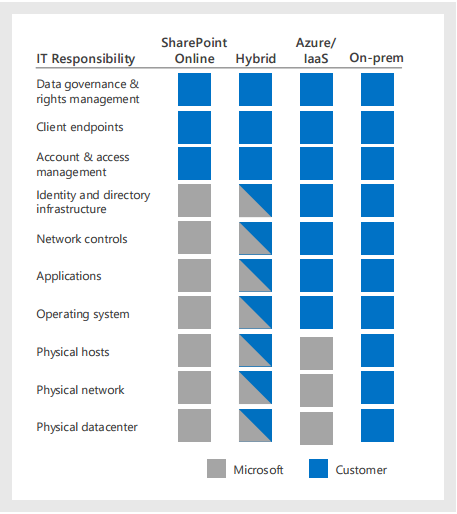
SharePoint 2016 Architectural Model
- SaaS Software as a Service – SharePoint Online
- IaaS Infrastructure as a Service – SharePoint on Azure
- Hybrid – SharePoint Online with SharePoint On-Prim
- On-Premises – SharePoint in on Customer Data Centre
1. SharePoint Online – SaaS:
- Software as a Service,(SharePoint) need to be subscribed from cloud and it will be available all the time.
- Software will be update date
Customer Responsibility:
- Data governance
- Rights Management
- Client EndPoint
- Access Management
- Account
Microsoft Responsibility
- Identity and Directory Infrastructure
- Network Controls
- Applications
- Operating System
- Physical Host, Network and Data center
Both(customer and Microsoft )
Responsibility
NA
2. SharePoint on Azure – IaaS:
- Extending On-Prim environment in to Microsoft Cloud Infrastructure Azure
- Deploy SharePoint 2016 This is recommended for high availability/ disaster recovery and dev/test environments
Customer
Responsibility:
- Data governance
- Rights Management
- Client EndPoint
- Access Management
- Account
- Identity and Directory Infrastructure
- Network Controls
- Applications
- Operating System
Microsoft Responsibility
- Physical Host, Network and Data center
Both(customer and Microsoft )
Responsibility
NA
3. SharePoint on Hybrid :
- Combination of both SharePoint Online and SharePoint On-Prim
Customer Responsibility:
- Data governance
- Rights Management
- Client EndPoint
- Access Management
- Account
Customer and Microsoft
Responsibility
- Identity and Directory Infrastructure
- Network Controls
- Applications
- Operating System
- Physical Host, Network and Data centre
4. SharePoint on Promises :
- Deploy SharePoint on customer data centre
Customer Responsibility:
- Data governance
- Rights Management
- Client EndPoint
- Access Management
- Account
- Identity and Directory Infrastructure
- Network Controls
- Applications
- Operating System
- Physical Host, Network and Data centre
Wednesday, December 14, 2016
Best Practices: Common Coding Issues When Using the SharePoint Object Model
WSS 3.0 : https://msdn.microsoft.com/en-us/library/bb687949.aspx
SharePoint Add-in: https://msdn.microsoft.com/EN-US/library/fp179922.aspx
SharePoint Add-in: https://msdn.microsoft.com/EN-US/library/fp179922.aspx
Wednesday, August 3, 2016
Export and Import SharePoint List with content using PowerShell
We had SharePoint farms in many variation SharePoint 2007, SharePoint 2010 and SharePoint 2013. Recently I had worked on a assignment that migrating single list data from SharePoint 2007 to SharePoint 2010. Initially I thought that it bit easy task but when get in to it, it had given many issue because I was told that there should not be any change in the data including modified date, modified by, created data, created by finally all versions as it is.
I was in trouble because the source list is 100% customized(custom fields, custom content types, list definition, event receivers and New, Edit & display forms as well)
I had upgraded the custom functionality to SharePoint 2010 excluding custom input forms. But export import command, failed all the time.
Ends with lot off issue like, fields are duplicated, content type is not matching, field ids are not matching, destination web, list are are not available and so many.
Thought of implementing some data correcting before importing the SharePoint 2007 list content.
1. I had trimmed the custom source code only with Custom fields and Custom Content Types
2. Deployed the latest build on SharePoint 2010 farm
3. Created a new list and added custom content type, Enabled versioning and removed default content type "Item".
4. Created a test item using new custom content type
5. Exported the SharePoint 2010 list as.DAT file
6. Renamed .DAT to .CAB and extracted all files in to new folder
7. Exported SharePoint 2007 list as .DAT file
8. Renamed .DAT to .CAB and Extracted all files in to new folder
9. Opened the manifest.xml file from SharePoint 2007 extracted folder and copied SPListItem elements
10. Opened the manifest.xml file from SharePoint 2010 extracted folder and pasted Copied SPListItem elements.
11. Replaced the below ids on newly pasted element
ParentId, ParentWebId, FileUrl,URL,ContentTypeId,
12.Created .CAB files form extracted SharePoint 2010 files.(used makecab.exe)
13. Imported the cab to SharePoint 2010
14. Verified the list
15. All worked fine.
Blow are the PowerShell scripts I used for migration.
Export SharePoint List
# For Export a specified SharePoint List
Export-List "http://kmsnet:15006/Lists/sklist/"
function Export-List([string]$ListURL)
{
[System.Reflection.Assembly]::LoadWithPartialName("Microsoft.SharePoint") > $null
[System.Reflection.Assembly]::LoadWithPartialName("Microsoft.SharePoint.Deployment") > $null
$versions = [Microsoft.SharePoint.Deployment.SPIncludeVersions]::All
$exportObject = New-Object Microsoft.SharePoint.Deployment.SPExportObject
$exportObject.Type = [Microsoft.SharePoint.Deployment.SPDeploymentObjectType]::List
$exportObject.IncludeDescendants = [Microsoft.SharePoint.Deployment.SPIncludeDescendants]::All
$settings = New-Object Microsoft.SharePoint.Deployment.SPExportSettings
$settings.ExportMethod = [Microsoft.SharePoint.Deployment.SPExportMethodType]::ExportAll
$settings.IncludeVersions = $versions
$settings.IncludeSecurity = [Microsoft.SharePoint.Deployment.SPIncludeSecurity]::All
$settings.OverwriteExistingDataFile = 1
$settings.ExcludeDependencies = $true
$site = new-object Microsoft.SharePoint.SPSite($ListURL)
Write-Host "ListURL", $ListURL
$web = $site.OpenWeb()
$list = $web.GetList($ListURL)
$settings.SiteUrl = $web.Url
$exportObject.Id = $list.ID
$settings.FileLocation = "C:\Temp\BackupRestoreTemp\"
$settings.BaseFileName = "ExportList-"+ $list.ID.ToString() +".DAT"
$settings.FileCompression = 1
Write-Host "FileLocation", $settings.FileLocation
$settings.ExportObjects.Add($exportObject)
$export = New-Object Microsoft.SharePoint.Deployment.SPExport($settings)
$export.Run()
$web.Dispose()
$site.Dispose()
}
Import SharePoint List
# For Import the list you export in previous command
Import-List "http://kmsnet:15006" "C:\SK_DEV\sklist.cab" "C:\SK_DEV\OUT\ImportLog.txt"
function Import-List([string]$DestWebURL, [string]$FileName, [string]$LogFilePath)
{
[System.Reflection.Assembly]::LoadWithPartialName("Microsoft.SharePoint") > $null
[System.Reflection.Assembly]::LoadWithPartialName("Microsoft.SharePoint.Deployment") > $null
$settings = New-Object Microsoft.SharePoint.Deployment.SPImportSettings
$settings.IncludeSecurity = [Microsoft.SharePoint.Deployment.SPIncludeSecurity]::All
$settings.UpdateVersions = [Microsoft.SharePoint.Deployment.SPUpdateVersions]::Overwrite
$settings.UserInfoDateTime = [Microsoft.SharePoint.Deployment.SPImportUserInfoDateTimeOption]::ImportAll
$site = new-object Microsoft.SharePoint.SPSite($DestWebURL)
Write-Host "DestWebURL", $DestWebURL
$web = $site.OpenWeb()
Write-Host "SPWeb", $web.Url
$settings.SiteUrl = $web.Url
$settings.WebUrl = $web.Url
$settings.FileLocation = "C:\SK_DEV\OUT\"
$settings.BaseFileName = $FileName
$settings.LogFilePath = $LogFilePath
$settings.FileCompression = 1
Write-Host "FileLocation", $settings.FileLocation
$import = New-Object Microsoft.SharePoint.Deployment.SPImport($settings)
$import.Run()
$web.Dispose()
$site.Dispose()
}
I was in trouble because the source list is 100% customized(custom fields, custom content types, list definition, event receivers and New, Edit & display forms as well)
I had upgraded the custom functionality to SharePoint 2010 excluding custom input forms. But export import command, failed all the time.
Ends with lot off issue like, fields are duplicated, content type is not matching, field ids are not matching, destination web, list are are not available and so many.
Thought of implementing some data correcting before importing the SharePoint 2007 list content.
1. I had trimmed the custom source code only with Custom fields and Custom Content Types
2. Deployed the latest build on SharePoint 2010 farm
3. Created a new list and added custom content type, Enabled versioning and removed default content type "Item".
4. Created a test item using new custom content type
5. Exported the SharePoint 2010 list as.DAT file
6. Renamed .DAT to .CAB and extracted all files in to new folder
7. Exported SharePoint 2007 list as .DAT file
8. Renamed .DAT to .CAB and Extracted all files in to new folder
9. Opened the manifest.xml file from SharePoint 2007 extracted folder and copied SPListItem elements
10. Opened the manifest.xml file from SharePoint 2010 extracted folder and pasted Copied SPListItem elements.
11. Replaced the below ids on newly pasted element
ParentId, ParentWebId, FileUrl,URL,ContentTypeId,
12.Created .CAB files form extracted SharePoint 2010 files.(used makecab.exe)
13. Imported the cab to SharePoint 2010
14. Verified the list
15. All worked fine.
Blow are the PowerShell scripts I used for migration.
Export SharePoint List
# For Export a specified SharePoint List
Export-List "http://kmsnet:15006/Lists/sklist/"
function Export-List([string]$ListURL)
{
[System.Reflection.Assembly]::LoadWithPartialName("Microsoft.SharePoint") > $null
[System.Reflection.Assembly]::LoadWithPartialName("Microsoft.SharePoint.Deployment") > $null
$versions = [Microsoft.SharePoint.Deployment.SPIncludeVersions]::All
$exportObject = New-Object Microsoft.SharePoint.Deployment.SPExportObject
$exportObject.Type = [Microsoft.SharePoint.Deployment.SPDeploymentObjectType]::List
$exportObject.IncludeDescendants = [Microsoft.SharePoint.Deployment.SPIncludeDescendants]::All
$settings = New-Object Microsoft.SharePoint.Deployment.SPExportSettings
$settings.ExportMethod = [Microsoft.SharePoint.Deployment.SPExportMethodType]::ExportAll
$settings.IncludeVersions = $versions
$settings.IncludeSecurity = [Microsoft.SharePoint.Deployment.SPIncludeSecurity]::All
$settings.OverwriteExistingDataFile = 1
$settings.ExcludeDependencies = $true
$site = new-object Microsoft.SharePoint.SPSite($ListURL)
Write-Host "ListURL", $ListURL
$web = $site.OpenWeb()
$list = $web.GetList($ListURL)
$settings.SiteUrl = $web.Url
$exportObject.Id = $list.ID
$settings.FileLocation = "C:\Temp\BackupRestoreTemp\"
$settings.BaseFileName = "ExportList-"+ $list.ID.ToString() +".DAT"
$settings.FileCompression = 1
Write-Host "FileLocation", $settings.FileLocation
$settings.ExportObjects.Add($exportObject)
$export = New-Object Microsoft.SharePoint.Deployment.SPExport($settings)
$export.Run()
$web.Dispose()
$site.Dispose()
}
Import SharePoint List
# For Import the list you export in previous command
Import-List "http://kmsnet:15006" "C:\SK_DEV\sklist.cab" "C:\SK_DEV\OUT\ImportLog.txt"
function Import-List([string]$DestWebURL, [string]$FileName, [string]$LogFilePath)
{
[System.Reflection.Assembly]::LoadWithPartialName("Microsoft.SharePoint") > $null
[System.Reflection.Assembly]::LoadWithPartialName("Microsoft.SharePoint.Deployment") > $null
$settings = New-Object Microsoft.SharePoint.Deployment.SPImportSettings
$settings.IncludeSecurity = [Microsoft.SharePoint.Deployment.SPIncludeSecurity]::All
$settings.UpdateVersions = [Microsoft.SharePoint.Deployment.SPUpdateVersions]::Overwrite
$settings.UserInfoDateTime = [Microsoft.SharePoint.Deployment.SPImportUserInfoDateTimeOption]::ImportAll
$site = new-object Microsoft.SharePoint.SPSite($DestWebURL)
Write-Host "DestWebURL", $DestWebURL
$web = $site.OpenWeb()
Write-Host "SPWeb", $web.Url
$settings.SiteUrl = $web.Url
$settings.WebUrl = $web.Url
$settings.FileLocation = "C:\SK_DEV\OUT\"
$settings.BaseFileName = $FileName
$settings.LogFilePath = $LogFilePath
$settings.FileCompression = 1
Write-Host "FileLocation", $settings.FileLocation
$import = New-Object Microsoft.SharePoint.Deployment.SPImport($settings)
$import.Run()
$web.Dispose()
$site.Dispose()
}
Monday, July 25, 2016
SharePoint 2013 Service Application comparison of each editions
| Service Application | Foundation | Standard | Enterprise | Online |
|---|---|---|---|---|
| Access Services | No | No | Yes | Yes |
| Access Services 2010 | No | No | Yes | No |
| Apps Management Service | Yes | Yes | Yes | Yes |
| Business Data Connectivity Service | Yes | Yes | Yes | Yes |
| Excel Services application | No | No | Yes | Yes |
| Machine Translation Service | No | No | Yes | Yes |
| PerformancePoint Service Application | No | No | Yes | No |
| PowerPoint Automation Service | No | Yes | Yes | Yes |
| Managed Metadata Service Application | Yes | Yes | Yes | Yes |
| Secure Store Service Application | No | Yes | Yes | Yes |
| Search Service Application | Yes* | Yes | Yes | Yes |
| State Service Application | Yes | Yes | Yes | Yes |
| UserProfile Service Application | No | Yes | Yes | Yes |
| Visio Graphics Service | No | No | Yes | Yes |
| Word Automation Services | No | Yes | Yes | Yes |
| Workflow Management Service Application | Yes | Yes | Yes | Yes |
| Work Management Service Application | No | Yes | Yes | Yes |
| Site Subscription Settings Services | Yes | Yes | Yes | Yes |
| UserAndHealth Data Services | Yes | Yes | Yes | Yes |
SharePoint 2013 Insights comparison of each editions
| Insights features | Foundation | Standard CAL | Enterprise CAL | Online |
|---|---|---|---|---|
| Business Intelligence Center | No | No | Yes | TBA |
| Calculated Measures and Members | No | No | Yes | TBA |
| Data Connection Library | No | No | Yes | TBA |
| Decoupled PivotTables and PivotCharts | No | No | Yes | TBA |
| Excel Services | No | No | Yes | Yes |
| Field list and Field Support | No | No | Yes | TBA |
| Filter Enhancements | No | No | Yes | TBA |
| Filter Search | No | No | Yes | TBA |
| PerformancePoint Services | No | No | Yes | TBA |
| PerformancePoint Services (PPS) Dashboard Migration | No | No | Yes | TBA |
| Power View for Excel in SharePoint | No | No | Yes | TBA |
| Power Pivot for Excel in SharePoint | No | No | Yes | TBA |
| Quick Explore | No | No | Yes | TBA |
| Scorecards & Dashboards | No | No | Yes | TBA |
| SQL Server Reporting Services (SSRS) Integrated Mode | Yes | Yes | Yes | TBA |
| Timeline Slicer | No | No | Yes | TBA |
| Visio Service | No | No | Yes | TBA |
Subscribe to:
Posts (Atom)